CRM · ATTRIBUTION · SALES · OPERATIONS

Make every lead visible, owned and measurable.

AdyOps connects the form submission, campaign source, assigned team member, follow-up history, confirmed order and delivery outcome in one operating workspace.

Source-linkedUTMs, ad IDs and placement with every lead
Team-visibleOwnership, live activity and performance
Order-connectedConfirmation, logistics, NDR and RTO
app.adyops.comSecure CRM workspace
Actual AdyOps owner dashboard
Actual AdyOps interface · Demo environment
Quick answer

What is AdyOps?

AdyOps is a web-based CRM and business operations platform for lead-driven companies. It keeps marketing attribution, customer follow-up, team ownership, sales, confirmation and logistics attached to the same lead record.

One connected operating flow

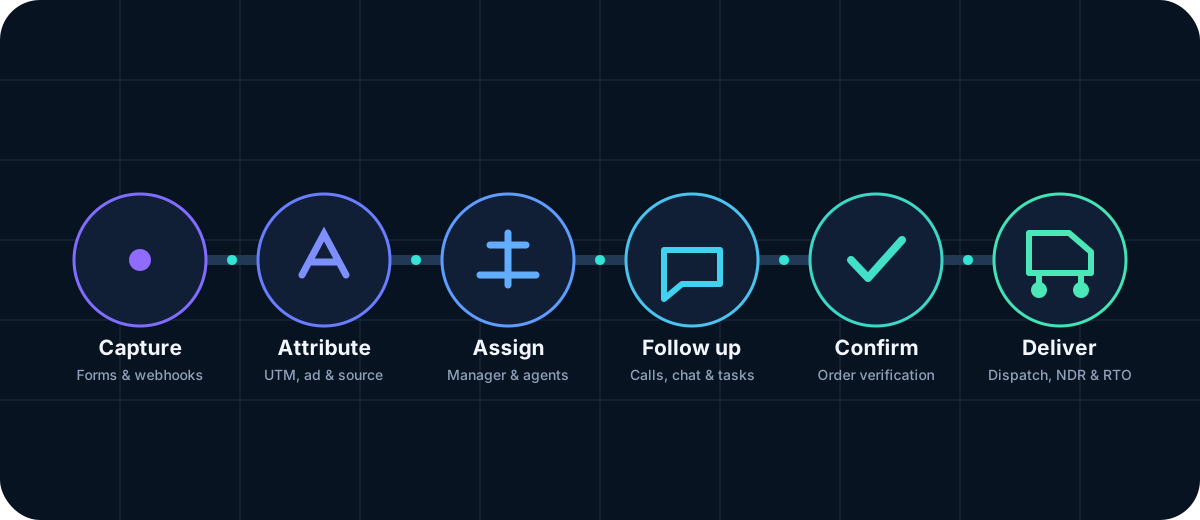
From first form submission to final delivery status.

Instead of moving customer details between personal sheets and disconnected tools, AdyOps keeps each stage connected with a clear owner and timestamp.

AdyOps lead workflow from capture to delivery
Product explained in detail

Every major AdyOps feature, shown with the interface.

These sections use current AdyOps screens so buyers can understand what the product does before requesting a demo.

Feature 01

Lead capture and unified CRM

Keep every source and every follow-up attached to one lead.

AdyOps accepts form submissions, imports and webhook leads, then gives the team one searchable record with status, ownership, last connected time and remarks.

  • Validated customer fields and duplicate controls
  • Bulk import, export, recycle bin and restore
  • New-first sorting, filters and quick actions
View actual interface
Actual AdyOps Lead capture and unified CRM interfaceActual AdyOps interface
Feature 02

Meta Ads and UTM revenue intelligence

Connect ad spend with confirmed orders—not just lead volume.

The owner dashboard combines configured Meta metrics with campaign, ad set, ad and placement identifiers stored against each lead. This helps teams compare spend, follow-ups, confirmed orders and estimated revenue in the same date range.

  • Meta spend, impressions, reach, clicks, CTR, CPC and CPL
  • Campaign, ad set, ad and placement-level reporting
  • Cost per confirmed order, order ROAS and lead attribution ledger
View actual interface
Actual AdyOps Meta Ads and UTM revenue intelligence interfaceActual AdyOps interface
Feature 03

Form builder, embed code and webhooks

Create a protected lead form without rebuilding the landing page.

Build forms with custom fields, validation, styling and thank-you routing. Generate an embed code or webhook URL and preserve attribution parameters when the visitor submits.

  • Name, phone, address, pincode and custom fields
  • UTM, campaign ID, ad set ID, ad ID, placement and click IDs
  • Duplicate mobile/IP protection and auto-address options
View actual interface
Actual AdyOps Form builder, embed code and webhooks interfaceActual AdyOps interface
Feature 04

Sales workspace and smart assignment

Give managers a clear daily operating dashboard.

Managers can review fresh leads, pending follow-ups, confirmed orders, sales value and recent leads. Auto assignment can distribute new leads to active agents, while manual assignment remains available.

  • Fresh, pending, follow-up and confirmed counters
  • Agent leaderboard and recent lead view
  • Equal auto assignment to active agents
View actual interface
Actual AdyOps Sales workspace and smart assignment interfaceActual AdyOps interface
Feature 05

Live team tracking and working sessions

Know who is active, when they connected and how long they worked.

Live presence and workforce monitoring make team availability visible without manual attendance sheets. Owners can inspect current activity and historical working sessions.

  • Active and inactive team visibility
  • Login, logout and working-session duration
  • Manager and agent filtering
View actual interface
Actual AdyOps Live team tracking and working sessions interfaceActual AdyOps interface
Feature 06

Team performance and sales reporting

Compare output by manager, agent, orders and value.

Performance reports bring lead handling, conversion, confirmed orders and sales together. Managers can coach agents with data, while owners can compare teams over the same period.

  • Manager-wise and agent-wise totals
  • Confirmed order and conversion analysis
  • Sales value, growth and productivity view
View actual interface
Actual AdyOps Team performance and sales reporting interfaceActual AdyOps interface
Feature 07

Live chat and operational coordination

Keep team conversations inside the system where work happens.

Owner chat connects managers, confirmation and logistics. Managers can coordinate with agents, see presence, receive unread alerts and exchange supported images or documents.

  • Online/offline presence and unread badges
  • Conversation history and latest-message controls
  • Controlled image and document attachments
View actual interface
Actual AdyOps Live chat and operational coordination interfaceActual AdyOps interface
Feature 08

Agent activity and overdue follow-up control

Surface work queues before leads go cold.

Activity views show workload, pending action, follow-up status and team availability. Overdue fresh-lead alerts help managers focus on records that have not been contacted within the configured threshold.

  • Fresh-lead and overdue visibility
  • Agent workload and pending action
  • Last connected time and follow-up history
View actual interface
Actual AdyOps Agent activity and overdue follow-up control interfaceActual AdyOps interface
01

Confirmation & Logistics

Move confirmed orders into verification, dispatch, NDR, RTO and delivered stages without losing the original lead history.

02

Google Sheet Sync

Connect configured sheets for backup reporting and operational sync while keeping CRM status and attribution fields structured.

03

Import, Export & Recycle Bin

Map uploaded columns, tag imported leads, export reports, soft delete records and restore them before permanent deletion.

04

Roles & Permissions

Separate owner, manager, agent, confirmation and logistics access so each team sees only the data needed for its work.

05

Single-Device Login

Optionally limit simultaneous sessions and use controlled takeover when a user moves from one device to another.

06

Alerts & Notifications

Surface overdue fresh leads, unread chat messages and pending work so the next action does not depend on memory.

Order operations

Confirmation and logistics stay connected to the original lead.

No duplicate order sheet and no lost campaign source.

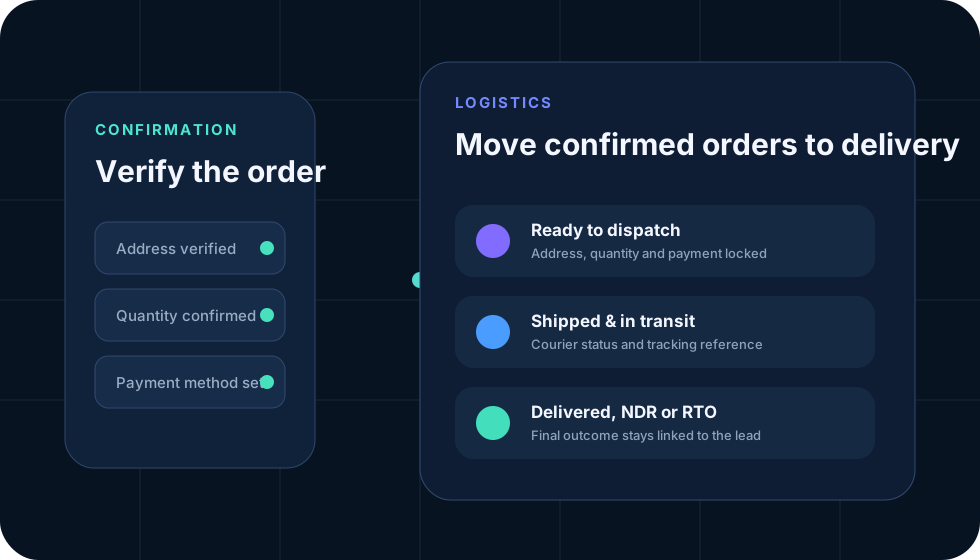
Confirmation can verify customer details and payment method, then hand the order to logistics. Dispatch, in-transit, NDR, RTO and delivered outcomes remain available for reporting.

  • Controlled confirmation handoff
  • Address and quantity verification
  • Dispatch and delivery status reporting
AdyOps confirmation and logistics workflow
View actual interface

Explore the AdyOps product screens.

Select a module to see the current demo interface. Tap or click the screenshot to open a larger preview.

01

Owner Intelligence

A single owner view for CRM totals, confirmed orders, follow-ups, Meta spend, attribution and performance ranking.

  • Date and status filters
  • Meta spend and order intelligence
  • Campaign, ad set and placement reporting
Request guided demo
Actual AdyOps Owner Intelligence interface
Role-based workspaces

Each team gets the workspace required for its job.

Advertising and owner-level intelligence can remain restricted while customer-facing teams receive the fields and actions needed for follow-up.

Owner

Control and intelligence

Meta reporting, lead attribution, users, forms, performance, live presence and settings.

Manager

Team and sales

Lead pipeline, assignment, agents, sales dashboard, activity and team messages.

Agent

Assigned leads

Customer details, status, last connected time, remarks, follow-ups and order actions.

Confirmation

Order verification

Review converted leads, verify details, prevent duplicate action and approve handoff.

Logistics

Delivery operations

Dispatch, courier reference, NDR, RTO, delivered outcome and operational remarks.

Complete capability matrix

What AdyOps covers across marketing, sales and operations.

CapabilityWhat it doesBusiness value
Lead captureForms, embed code, webhook, imports and custom fieldsFewer missing or disconnected leads
AttributionUTMs, source, campaign, ad set, ad, placement and click IDsConnect marketing source with CRM outcomes
Meta intelligenceConfigured spend, reach, clicks, CPL and confirmed-order analysisJudge campaigns beyond raw lead count
AssignmentManual or equal distribution to active agentsClear ownership and faster first contact
Follow-upStatus, remarks, callback, last connected and overdue alertsReduce leads lost through delayed action
Team trackingPresence, sessions, activity and workloadOperational visibility without attendance sheets
Sales reportingLeads, confirmed orders, conversion and sales valueCoach teams using measurable output
ChatRole-linked team conversations and supported attachmentsCoordinate work without leaving the CRM
Order operationsConfirmation, logistics, NDR, RTO and deliveryPreserve the complete customer journey
Data controlImport, export, recycle bin, restore and permissionsStructured data with safer administration
Connected data

Forms, Meta, sheets and team actions meet in one record.

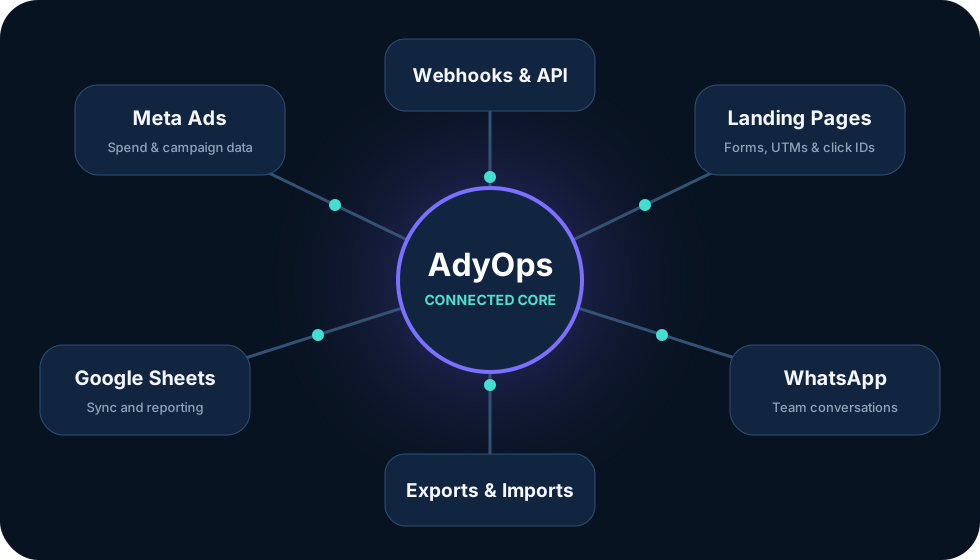
AdyOps can receive leads from landing pages and webhooks, retain campaign identifiers, read configured Meta reporting data and sync selected operational information with Google Sheets.

  • Webhook and embed integrations
  • Meta API connection and data settings
  • Google Sheet connection and sync status
AdyOps integration network
Five AdyOps CRM plans

Choose the team capacity, automation and reporting depth you need.

Start with CRM essentials, scale into Meta attribution and advanced operations, or configure a fully custom enterprise deployment.

Basic Plan

CRM Essentials

For small businesses and small calling teams that need a structured, mobile-ready CRM.

₹7,999/month
1 Manager10 Agents
  • Lead management CRM
  • Manual lead assignment
  • Follow-up and last-connected tracking
  • Basic sales dashboard
  • 3 lead capture forms
  • Standard email support
View complete feature list 18 items
  • Lead Management CRM
  • Customer Details Management
  • Manual Lead Assignment
  • Agent-wise Lead Distribution
  • Lead Status Management
  • Follow-up Management
  • Last Connected Date and Time
  • Agent Remarks
  • Basic Sales Dashboard
  • Agent Performance Summary
  • Lead Import and Export
  • Duplicate Lead Detection
  • Lead Search and Filters
  • Soft Delete and Restore
  • 3 Lead Capture Forms
  • Basic Form Builder
  • Mobile Responsive Dashboard
  • Standard Email Support
Choose Basic
Growth Plan

Team Growth CRM

For growing businesses and medium-size sales teams that need automation, reporting and attribution.

₹11,999/month
5 Managers100 Agents
  • Everything in Basic
  • Automatic equal lead distribution
  • Manager dashboards and teams
  • UTM and campaign tracking
  • 10 lead capture forms
  • Priority email and chat support
View complete feature list 22 items
  • Everything in Basic
  • Automatic Lead Assignment
  • Equal Lead Distribution
  • Manager-wise Teams
  • Manager Dashboard
  • Agent Active/Inactive Tracking
  • Manager and Agent Performance Reports
  • Follow-up Reminder System
  • Advanced Lead Filters
  • Bulk Lead Assignment
  • Bulk Status Update
  • Bulk Import and Export
  • Custom Lead Tags
  • Custom Lead Fields
  • 10 Lead Capture Forms
  • Advanced Form Builder
  • Webhook Integration
  • UTM Source Tracking
  • Campaign, Ad Set and Ad Tracking
  • Source and Placement Reports
  • Product-wise Lead Management
  • Priority Email and Chat Support
Choose Growth
Gold Plan

Advanced Operations

For high-volume businesses, large call centres and multi-team operations with custom workflows.

₹24,999/month
Configurable ManagersConfigurable Agents
  • Everything in Premium
  • Advanced workflow automation
  • Multi-branch and multiple sales teams
  • Live user activity monitoring
  • Custom dashboards and reports
  • Dedicated onboarding and training
View complete feature list 24 items
  • Everything in Premium
  • Advanced Workflow Automation
  • Custom Lead Distribution Rules
  • Department-wise Lead Assignment
  • Multi-Branch Management
  • Multiple Sales Teams
  • Advanced Confirmation Workflow
  • Advanced Logistics Workflow
  • Custom Sales Pipeline
  • Custom Status Workflow
  • Detailed Activity Logs
  • User Login and Logout Reports
  • Manager and Agent Activity Monitoring
  • Advanced Business Reports
  • Custom Dashboard Reports
  • Product-wise Revenue Reports
  • Campaign-wise Revenue Reports
  • Advanced API Access
  • Multiple Webhook Integrations
  • Priority Data Migration
  • Dedicated Account Manager
  • Dedicated Onboarding and Training
  • Priority Development Support
  • Highest Support Priority
Choose Gold
Custom Enterprise

Built Around Your Operation

For businesses that require completely customized limits, modules, integrations or deployment.

Custompricing
Custom ManagersCustom Agents
  • Custom CRM modules
  • Custom roles and permissions
  • WhatsApp, IVR and payment integrations
  • ERP and third-party integrations
  • Dedicated server deployment
  • Dedicated technical support
View complete feature list 15 items
  • Custom Number of Managers
  • Custom Number of Agents
  • Custom CRM Modules
  • Custom Dashboard Development
  • Custom Roles and Permissions
  • Custom Lead Workflow
  • Custom API Integrations
  • Custom WhatsApp API Integration
  • Custom IVR Integration
  • Custom Payment Gateway Integration
  • Custom ERP or Third-Party Integration
  • Dedicated Server Deployment
  • Custom Data Migration
  • Dedicated Technical Support
  • Custom Development Requirements
Request Enterprise Quote
Quick comparison

Monthly pricing and included team capacity

Talk to AdyOps sales ↗
PlanMonthly priceManagersAgentsBest for
Basic₹7,999110Small teams
Growth₹11,9995100Growing sales teams
PremiumMost Popular₹16,99915500D2C and performance teams
Gold₹24,999ConfigurableConfigurableHigh-volume operations
Custom EnterpriseCustom quoteCustomizedCustomizedCustom modules and integrations
Important pricing note

Usage and third-party costs are billed separately.

The monthly subscription does not include advertising spend or fees charged by external communication, hosting or integration providers.

  • Meta advertising spend
  • WhatsApp conversation and provider charges
  • SMS and calling charges
  • Third-party software charges
  • Domain and hosting charges
  • Custom development outside the selected plan
  • Paid third-party API or integration charges
Security and access

Protect customer data with controlled roles and sessions.

AdyOps includes application-level safeguards, but no online service can be honestly described as completely risk-free.

Production security also depends on hosting, updates, passwords, backups, integration credentials and correct configuration.

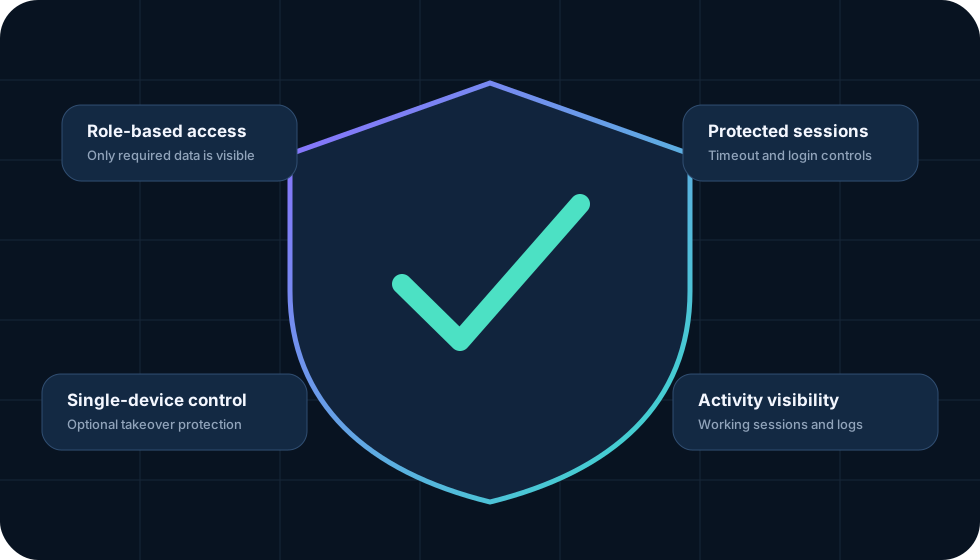
Role-based accessRestrict owner and customer data
Login protectionThrottling and lockout controls
Session controlsTimeout and optional single device
Activity visibilitySessions and operational logs
AdyOps security layers
Frequently asked questions

Questions teams ask before moving their workflow.

Capabilities depend on the modules, plan and integrations configured for the account.

Yes. Existing forms can send leads through a webhook, or you can use the AdyOps form builder and embed code. Correct implementation is required to capture the intended customer and attribution fields.

When Meta access and UTM tracking are configured correctly, the owner dashboard can compare campaign, ad set, ad and placement information with CRM-confirmed orders.

Yes. Enabled plans can show active and inactive agents, work sessions, activity, pending follow-ups and sales performance.

Gold configurations can move converted leads through confirmation, dispatch, in-transit, NDR, RTO and delivered stages.

The marketing website and AdyOps workspaces are designed for desktop and mobile use. Dense reports are easier to review on a larger screen, while lead actions, follow-ups and chat remain accessible on mobile.

No. AdyOps uses configured reporting data to connect advertising metrics with CRM outcomes. Campaign creation, billing and certain diagnostics remain in Meta's own tools.

Request a guided product demo

See AdyOps around your actual lead and sales workflow.

Tell us how your team currently captures, assigns and converts leads. We will focus the demo on the screens and controls that matter to your operation.

01
Actual interface walkthroughOwner dashboard, lead operations, forms, sales, live tracking and chat.
02
Workflow mappingSee how your lead source, team roles, follow-ups and order stages can connect.
03
Plan guidanceUnderstand which AdyOps plan and modules match your current team size.
Your details stay private.Used only to schedule and prepare your AdyOps demo. No promotional spam.
60-second request

Tell us about your operation

1 Contact details
👤
+91
2 Team and lead volume
3 Which areas should the demo cover?
0/1200

🔒 Secure submission · Data is currently stored in the AdyOps Google Sheet and can later be moved to the CRM without changing this form.